


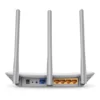
Tp-link TL-WR845N 300Mbps Wireless Router

Original price was: ৳ 1,679.৳ 1,550Current price is: ৳ 1,550.
Tp-link TL-WR845N
Key Features
- Model: TL-WR845N
- Frequency: 2.4-2.4835GHz
- WiFi Speed: up to 300 Mbps 2.4 GHz
- Interface: 1 x LAN & 4 x WAN ports
- Feature: IPV6, Access Control, IP & MAC Binding
Specification
| Key Features | ||
| Data Rate | up to 300 Mbps | |
| Antenna | 3× Fixed Antennas | |
| Button | WPS Button Reset Button |
|
| Frequency | 2.4 GHz: (802.11n) | |
| Interface | 1× 10/100 Mbps WAN Port 4× 10/100 Mbps LAN Ports |
|
| Network Standard | IEEE 802.11n/b/g 2.4 GHz (Wi-Fi 4) | |
| Encryption | WEP WPA WPA2 WPA/WPA2-Enterprise (802.1x) |
|
| Ports | 1 x WAN, 3x LAN | |
| Others | Router Mode Access Point Mode Range Extender Mode WISP Mode IPv4 IPv6 |
|
| Power Source | ||
| Power Mode | 9 V ⎓ 0.6 A | |
| Physical Dimension | ||
| Dimension | 9.1 × 5.7 × 1.4 in (230 × 144 × 35 mm) |
|
| Color | White | |
| Manufacturer warranty | ||
| Warranty | 1 year Warranty | |
TP-Link TL-WR845N 300Mbps Wireless Router
The TP-Link TL-WR845N 300Mbps Wireless N Router is a simple and budget-friendly single-band home router designed for basic internet usage such as browsing, social media, online classes, and video streaming. It is a widely used entry-level router in Bangladesh for small homes and low to medium internet speed plans.
The Tp-link TL-WR845N delivers wireless speeds of up to 300Mbps on the 2.4GHz band (N300 class). This makes it suitable for everyday tasks like web browsing, YouTube streaming, and online communication. However, it is optimized for basic usage and small bandwidth needs, not heavy gaming or high-speed fiber connections.
It comes with 3 fixed high-gain antennas, which help improve wireless coverage and stability across small to medium-sized rooms. These antennas increase signal strength and reduce dead zones in typical home environments.
The Tp-link TL-WR845N router supports multiple working modes including Router Mode, Access Point Mode, Range Extender Mode, and WISP Mode, giving users flexibility to adapt it for different network setups.
For network control, it includes useful features such as guest network support, parental controls, QoS (bandwidth control), and firewall security (SPI). These features help manage internet usage and improve safety for family environments.
Tp-link TL-WR845N Setup is very easy using the TP-Link Tether app or web interface, allowing quick installation and simple management from a smartphone or computer.
Overall, the TL-WR845N is a reliable and low-cost router for users in Bangladesh who need basic WiFi coverage and stable performance for light internet usage.
Key Specifications
- Model: TP-Link TL-WR845N
- Speed: Up to 300Mbps (2.4GHz)
- WiFi Standard: Wi-Fi 4 (802.11n)
- Band: Single Band (2.4GHz)
- Antennas: 3× fixed high-gain antennas
- Ports: 1× WAN + 4× LAN (10/100Mbps)
- Features: Router / AP / Range Extender / WISP modes
- Security: WPA/WPA2, SPI Firewall, Guest Network
- Control: TP-Link Tether App
Visit our Website, follow our Facebook Page, and view our Google Business Profile for the latest updates.
The TP-Link TL-WR845N is a very basic entry-level router mainly designed for small homes, light internet usage, and older broadband connections.
It gives up to 300Mbps on 2.4GHz (Wi-Fi 4 / 802.11n), which is enough for simple tasks like browsing, YouTube, online classes, and social media. But it is important to understand its limits:
- It is single-band (2.4GHz only) → slower and more crowded network
- It uses Fast Ethernet ports (10/100 Mbps) → your wired speed cannot go beyond ~100Mbps
- It is best for light use and small areas, not heavy gaming or high-speed fiber internet
In real use, you will usually get much less than 300Mbps because 2.4GHz WiFi is shared, affected by interference, and not stable for high-speed workloads.
The Tp-link TL-WR845N delivers wireless speeds of up to 300Mbps on the 2.4GHz band (N300 class). This makes it suitable for everyday tasks like web browsing, YouTube streaming, and online communication. However, it is optimized for basic usage and small bandwidth needs, not heavy gaming or high-speed fiber connections.
If your internet plan is around 50–100Mbps, it can still work fine. But if you are using high-speed fiber (100Mbps+) or many devices, you will quickly feel lag, buffering, and weak coverage compared to dual-band or gigabit routers.
Be the first to review “Tp-link TL-WR845N 300Mbps Wireless Router”
Related products




Reviews
There are no reviews yet.